Contacts Telephone List Issue
Hi,
I had my Contacts Telephone List setup (Tools > Admin > Edit
Contact defaults > Telephone Labels) and this contained 16
values.
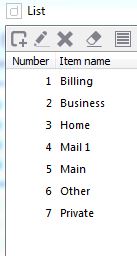
After a number of contacts were created (19 to be exact), the list
removed most of the values itself and now only contains 7
There is also an entry called "Mail 1" which was never in the
original list.
How can values disappear from lists? This is of concern...

-
 BiteSpire
- State changed from new to open
Status: Urgent. To be fixed in 1.0.3.2
You can check the raw data of the lists by going to the Data Files folder Defaults: eg: C:\BiteSpire\doogiePIM\Data Files\Defaults
There are several text files. Open the Contacts list in Notepad (or other text editor) and see if your other entries are there, or if there appears to be rogue characters that could cause corruption.Let me know your results and I'll work on doing some tests myself. A fix can be in place quite quickly as I planned to upload version 1.0.3.2 later today anyway.
-
 John Hinckley
Checked the txt file and this matches what is in the application (incorrect/corrupt list).
I cannot see any characters considered rogue, just regular A-Z used for all labels.
I can confirm that 2/3 of the entries have simply vanished, and 'Mail 1' as appeared which was never in the list, but is in the email list.Thanks Chris.
-
BiteSpire
Status: Verified. Fix in progress.
I've discovered a possible cause of the problem - this being the Contact Edit window is open whilst editing the Admin/Contact labels. This caused a conflict on saving the labels. I'm currently fixing this and a new version should be available later tonight.
-
John Hinckley
Excellent news!
It is possible I had the edit contacts form open while changing the list, can't recall or say for sure.
I'll wait for the new version and continue entering contacts, and will report back if it happens again.Thanks Chris for sorting this so quickly.
John
-
John Hinckley
Can I also just clarify how this list is used in the list of telephone numbers on the contact record?
For example, does it link to the ID (number in the list), or the name?Does it matter what order you have your default list in?
If you change the default list, will it change any existing contact's entries?Thanks to confirm.
-
BiteSpire
- State changed from open to resolved
- Milestone changed from 1.0.3 to 1.0.3.1
Status: Fixed. Resolved in 1.0.3.2
A fix has been implemented and released in version 1.0.3.2 https://bitespire.com/community/61-doogiepim-latest-build-v1-0-3-2
To clarify the labels. These are simple visual labels and are not linked by any ID. Therefore, if a label is changed, none of the Contacts records are changed.
In a future version, I plan to change this old behaviour by using linked lists, so a label name change can be reflected throughout the database automatically. This does mean a core change in code so the feature won't be for a while yet.The order of the labels is now a custom order, just like Flag Markers and other categories. They used to sort automatically, but in version 1.0.3.2 I've removed the auto-sort function.
Please Sign in or create a free account to add a new ticket.
With your very own profile, you can contribute to projects, track your activity, watch tickets, receive and update tickets through your email and much more.