Flagged Events on Home Page are Not Chronological
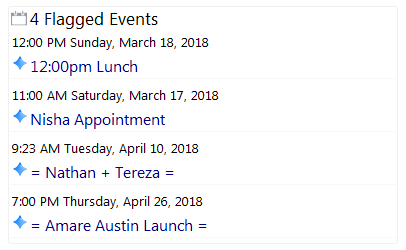
I'm still learned my way around doogiePIM (day #3 of my trial), and I have a quick question about the display of flagged events on my Home Page:
Is there a reason they are not displaying in order? If so, is there a way to ensure the display will be chronological?
With my thanks in advance,
Metta

-
 BiteSpire
- State changed from new to open
Status: To be fixed in version 2.0.1.2
The flagged events should be in chronological order (obviously). In your screenshot, Mar 17 should appear first.
I have located the bug and will be fixed accordingly. Thanks for the report.FYI: It is sorting the events by the Creation Date and Time and not the Event Date and Time
Chris
-
BiteSpire
- State changed from open to resolved
Status: Fixed in version 2.0.1.2
A quick fix. Tested and working.
-
 Metta Zetty
Fabulous! Thanks so much, Chris, for your prompt attention to this bug -- and your explanation of why it was happening. Very helpful. :-)
Also, will users be notified about updates like this one (2.0.1.2) with an alert inside the application? Or do we need to check for updates manually?
(I just now checked inside doogiePIM, and the system said I'm running the current version: 2.0.1.1)
-
BiteSpire
There is an option in the doogiePIM Settings/General "Check for New Updates at Startup". Keep that enabled so when there's a new update, you'll be informed when you launch doogiePIM.
If my Internet keeps working, the new update should be tomorrow afternoon at the latest (GMT).
Chris
Please Sign in or create a free account to add a new ticket.
With your very own profile, you can contribute to projects, track your activity, watch tickets, receive and update tickets through your email and much more.